
Creating Hierarchical DiagramsA Step-by-Step Implementation Guide
Master the implementation of hierarchical layouts with this hands-on tutorial. Learn how to create clear, structured diagrams that effectively represent directed relationships and hierarchical structures. Whether you're visualizing organizational charts, dependencies, or process flows, this guide will show you how to achieve optimal results.
What You'll Learn
- Configure and customize the hierarchical layout algorithm
- Control node positioning and layer assignment
- Implement edge routing and port constraints
- Handle cycles and edge direction
- Apply layout styles and visual customization
- Add interactivity and user controls
Prerequisites
Before starting this tutorial, you should:
- Have basic knowledge of JavaScript
- Understand fundamental graph theory concepts
- Be familiar with the yFiles library basics
- Have the yFiles library included in your project
Implementation Guide
Practical Examples
Basic Layout Implementation
Start with a simple hierarchical layout implementation:
Layer Management
Learn how to control node layers and positioning:
Edge Routing Optimization
Implement advanced edge routing techniques:
Visual Customization
Apply styling and visual enhancements:
Common Implementation Scenarios
Handling Complex Structures
Learn to handle special cases in hierarchical layouts:
- Dealing with cycles
- Managing multi-edge scenarios
- Handling cross-layer edges
- Implementing substructures
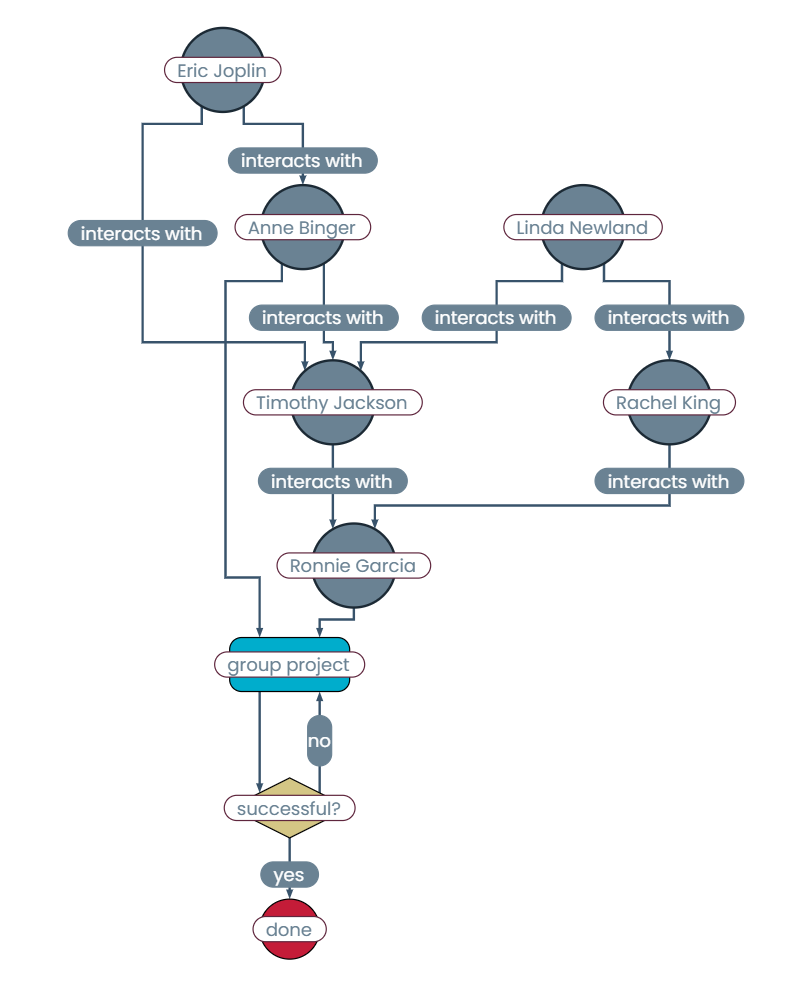
Best Practices and Tips
- Optimize layout performance for large graphs
- Handle dynamic data updates efficiently
- Implement proper error handling
- Consider user interaction patterns
- Plan for scalability
Ready to create your own
hierarchical diagrams?
Download yFiles Now!
We´d love to help you. Reach out and we'll get in touch with you.
Your message has been sent.
Choose your next steps
Get connected
Connect with our Customer Success Team regarding your ideas or projects.

Download yFiles
Try yFiles free of charge.
